Learn as you play · iPhone & iPad
Your tableside guide to American Mah Jongg.
Made for players still learning the game. Keep your rack in MAHJ while you play with your group, and it shows which hands on your card you're closest to, the tiles you still need, and a suggested Charleston pass.
As you get the hang of it, turn the help off one piece at a time. It never plays for you.
Free public beta for iPhone and iPad, through Apple's TestFlight app.
Why it exists
The arithmetic, done for you. The game, left to you.
Every player knows the moment: thirteen tiles, a card full of hands, and a quiet sum in your head. Am I closer to 2468 or the run? How many jokers can still help? MAHJ does that sum instantly, so you can keep your eyes on the table.
A companion, not a player
You pick your tiles, you make your calls, you declare Mah Jongg. The app shows you the card more clearly. It never makes a move.
Help you can dial down
Every kind of help has its own switch. Keep all of it while you learn, or turn it off one piece at a time.
Your card stays yours
The app doesn't come with a card. You enter the hands from the card you own, and they never leave your device.
Features
Everything you'd do with the paper card, only faster.
Your rack, ranked against the whole card
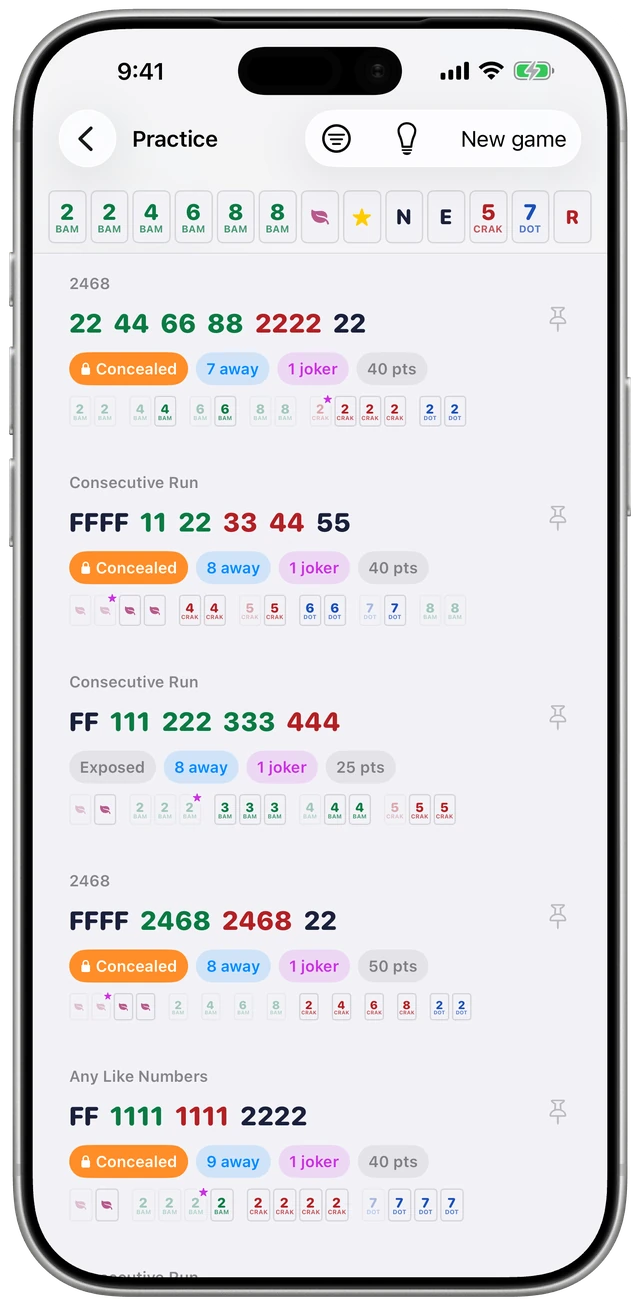
Tap in your tiles, and the list of closest hands re-ranks every time your rack changes. Each hand tells you how many tiles away you are and exactly which tiles would finish it.
- Jokers counted correctly. They fill pungs, kongs and larger groups, never pairs or singles, and the ranking knows it.
- Dead hands called out. When the tiles a hand needs are gone, it's marked dead, not just dropped from the list.
- Every way to play. Open any hand to see the actual tiles for each suit and number it allows.
- Your rack stays in view. Scroll down the list and a strip of your tiles stays pinned at the top, so you can check each hand against them.
- Concealed hands stand out. They wear an orange badge, so you don't call a discard into a hand that can't take it.
A Charleston guide that thinks in whole passes
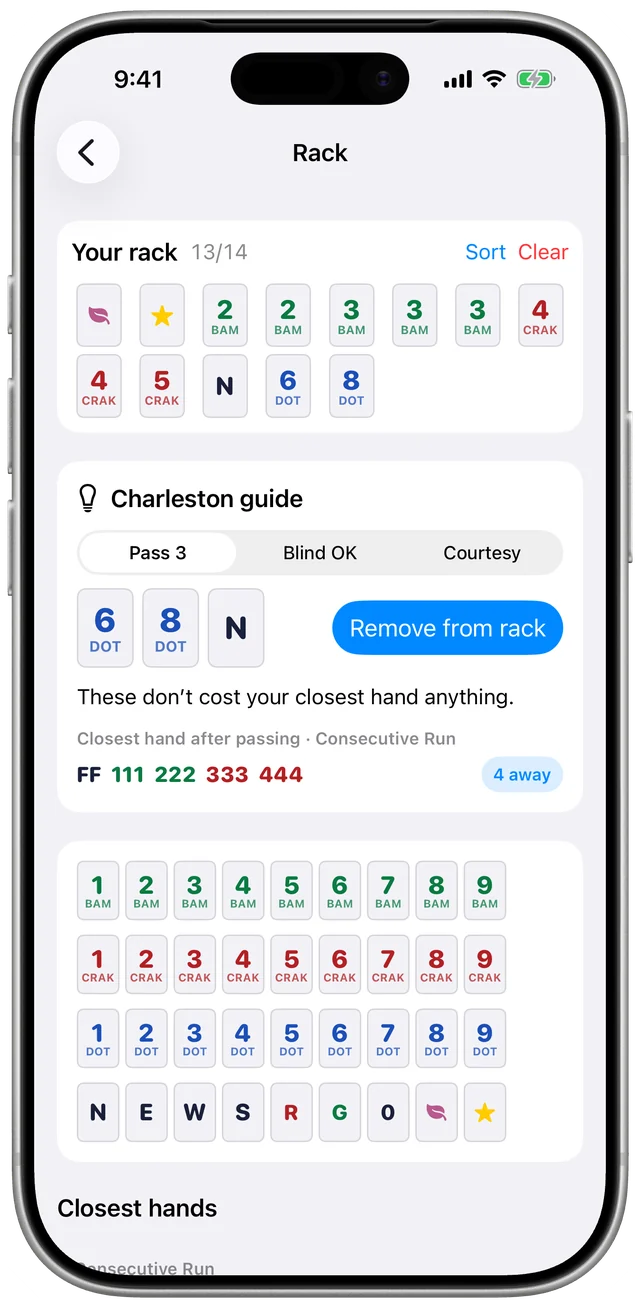
The Charleston is where hands are won and lost. The guide tries every set of tiles you could pass, then suggests the pass that keeps your best hand closest.
- Protects the hands you care about. Star a hand and the guide keeps it close, even if another hand is technically nearer.
- Passes defensively when it's free. No pairs, matching numbers, flowers or dragons, and one wind at a time.
- Knows the rules. It handles blind passes and the courtesy pass, and it never suggests passing a joker.
Practice a full game on your own
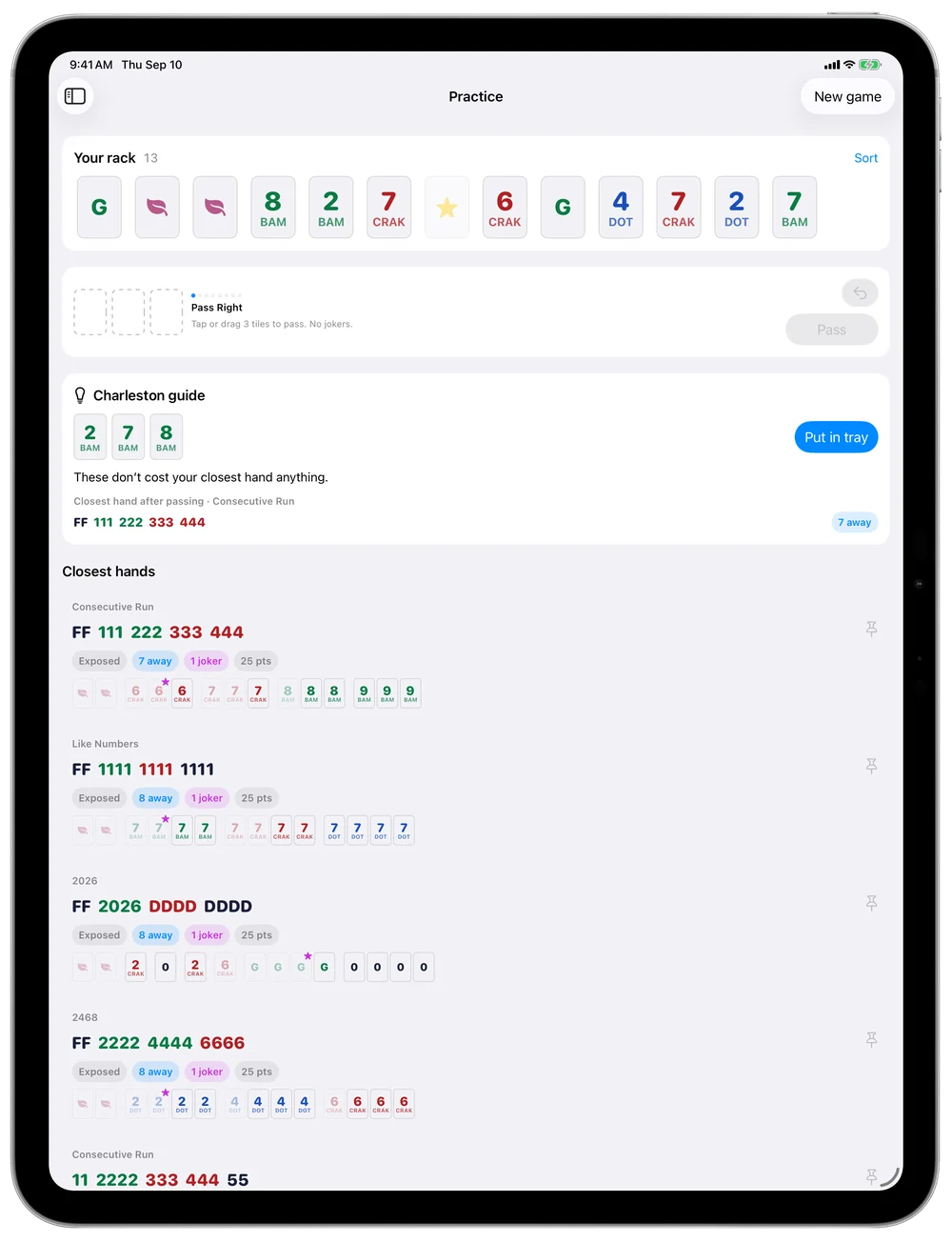
Get thirteen tiles, work through the Charleston, then draw and discard against a simulated wall. The rack and suggestions are the same ones you use at a real table, so practicing builds real habits.
- Calls and exposures. Claim discards from any of the three other seats, and expose pungs and kongs.
- Joker swaps. Trade a real tile for a joker sitting in an exposure, the way the rules allow.
- Pin a target hand. Track one hand for this game without touching your saved favorites.
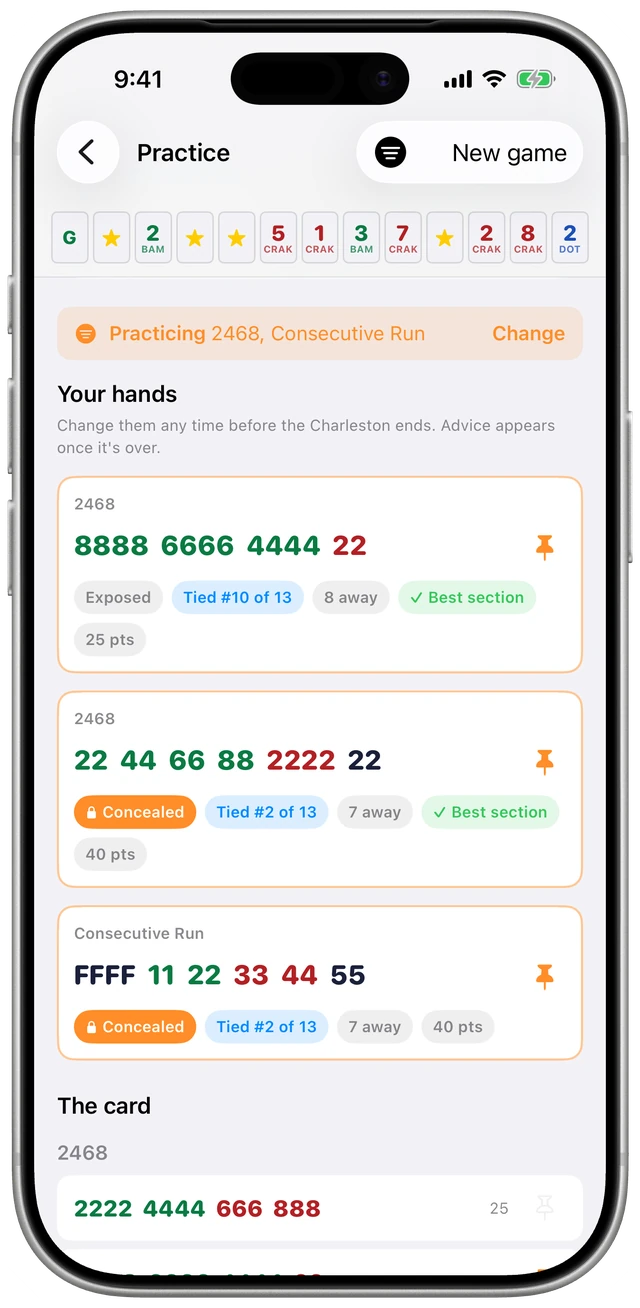
- Practice just part of the card. Choose sections, or only concealed or exposed hands, and the suggestions stick to them. An orange line reminds you what you've narrowed it to, and you can keep the choice for your next game.
Pick your hands before the hints
Want to find out how good your own eye is? Turn on Pick my hands before advice when you start a practice game. The suggestions stay hidden through the Charleston, and you pin one to three hands you'd go for from the card itself.
- See where your picks stand. Each pick shows its rank among the hands you're practicing and how many tiles away it is, and it updates after every pass.
- Told when you're on the right track. A pick is marked Best hand when nothing is closer, or Best section when a closer hand is in the same section. Hands the same distance away share a rank.
- Change your mind as tiles move. Swap picks at any point in the Charleston. The usual suggestions come back once it's over.
Narrow the card to what you're playing
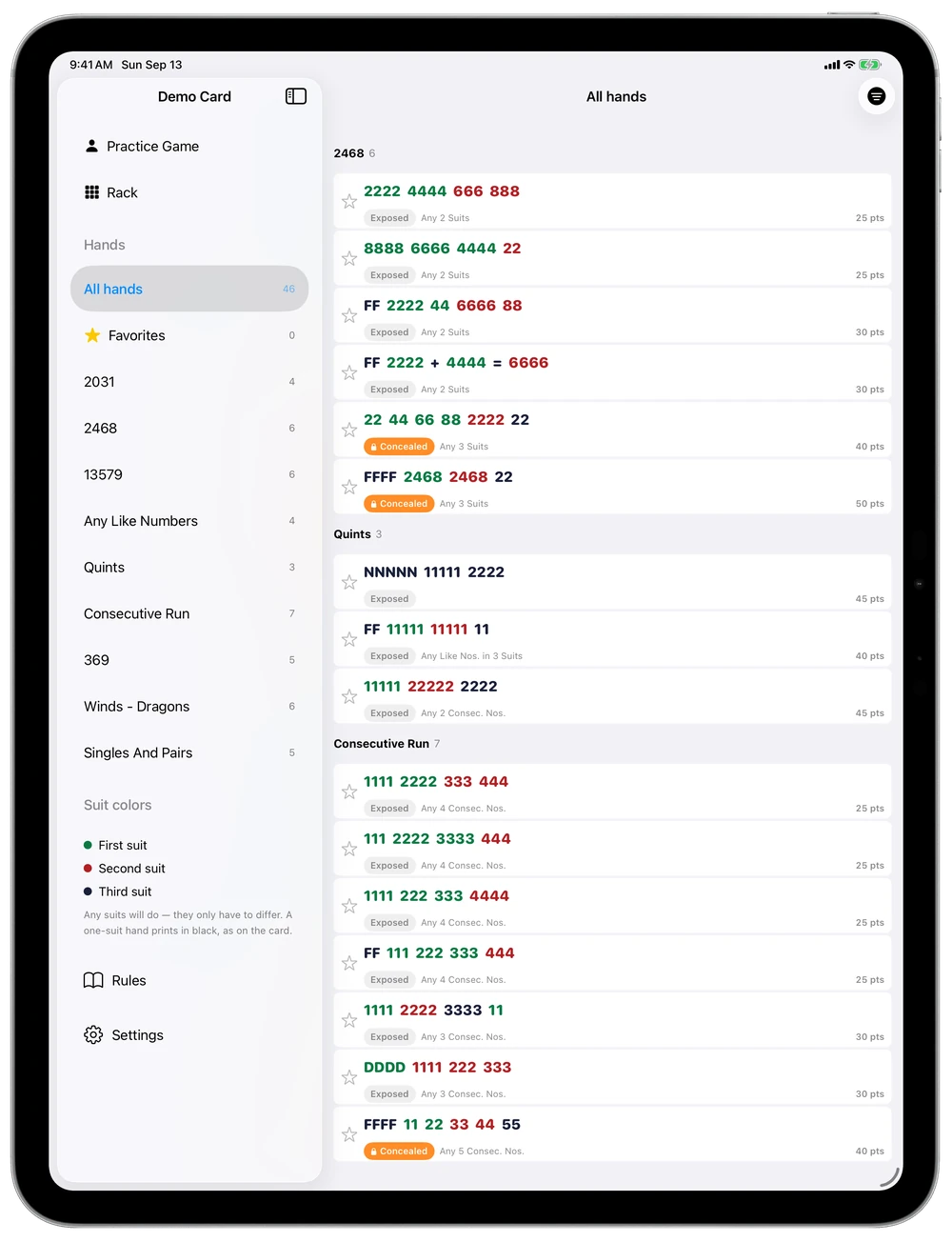
The filter button on the hands screen narrows the card by section, concealed or exposed, number of suits, and jokers. The Rack's suggestions follow the same filter, and it's still set the next time you open the app.
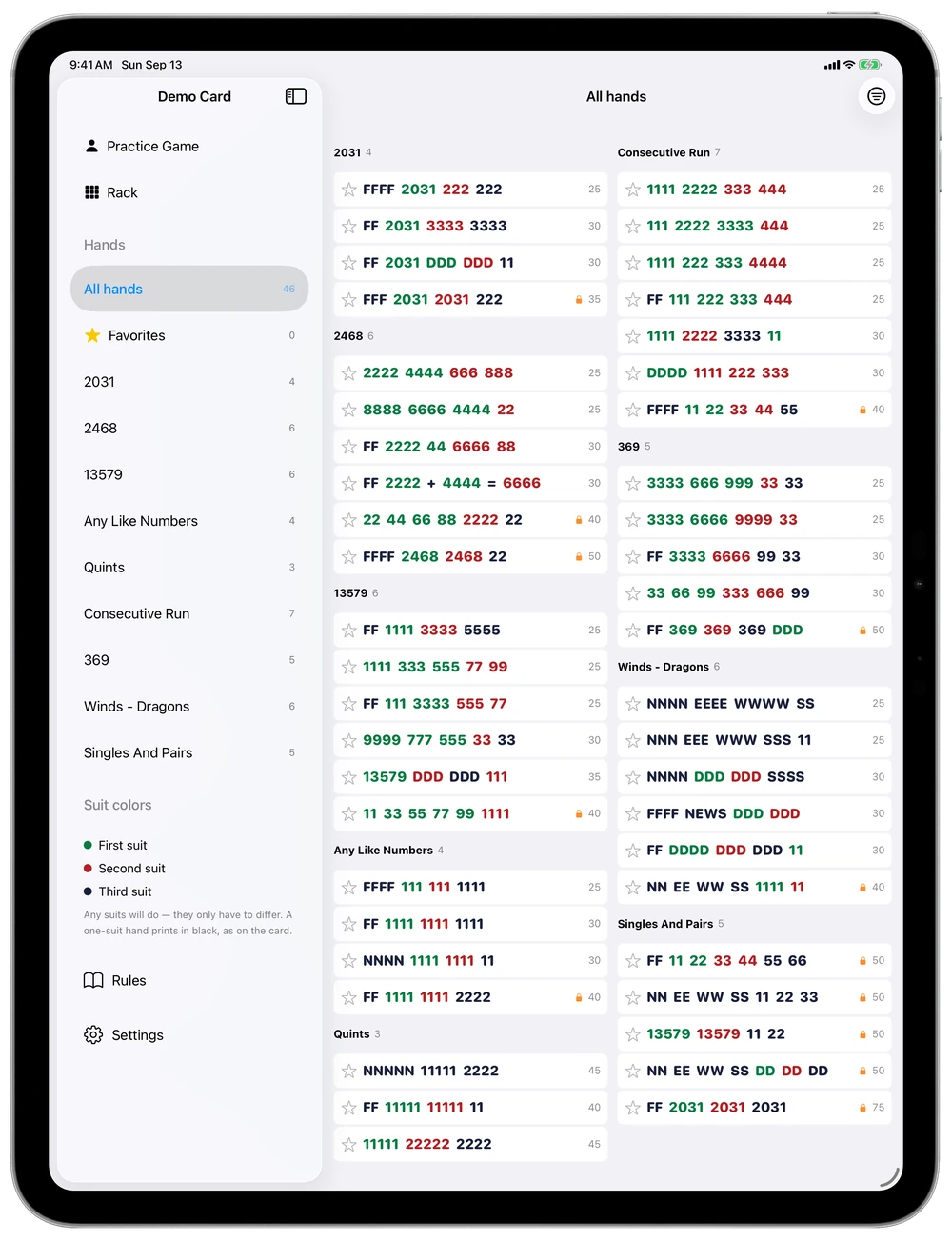
- Room to read. On iPad, the whole card fits on one screen. Filter it down and the hands get bigger to fill the space.
- More detail as space allows. With room to spare, each hand also shows its note from the card, concealed or exposed, whether it takes jokers, and its points.
Your level
As much help as you want, and no more.
A new player wants the hands ranked for them. A seasoned player may only want to hold their tiles. Suggestions go from off, to pointing at a section, to naming the hand, and every other kind of help is its own switch, so you keep exactly what's useful to you. The Rack and Practice each keep their own set, behind the lightbulb button, so you can practice with less help than you use at the table.
Show me everything
Closest hands, the tiles you need, and a suggested Charleston pass.
- Suggestions Hands
- Charleston guide
- Highlight tiles for my hands
Point me in a direction
See which section of the card is closest, but find the exact hand yourself.
- Suggestions Sections
- Charleston guide
- Highlight tiles for my hands
Just hold my tiles
Your rack and the hands you've starred. No suggestions at all.
- Suggestions Off
- Charleston guide
- Highlight tiles for my hands
Bring your own card
Enter the card you own, once a year.
The official card belongs to its publisher, so MAHJ doesn't include one. When you get the new card, add its hands and play from them all year. Keep last year's card too, and switch between them in a tap.
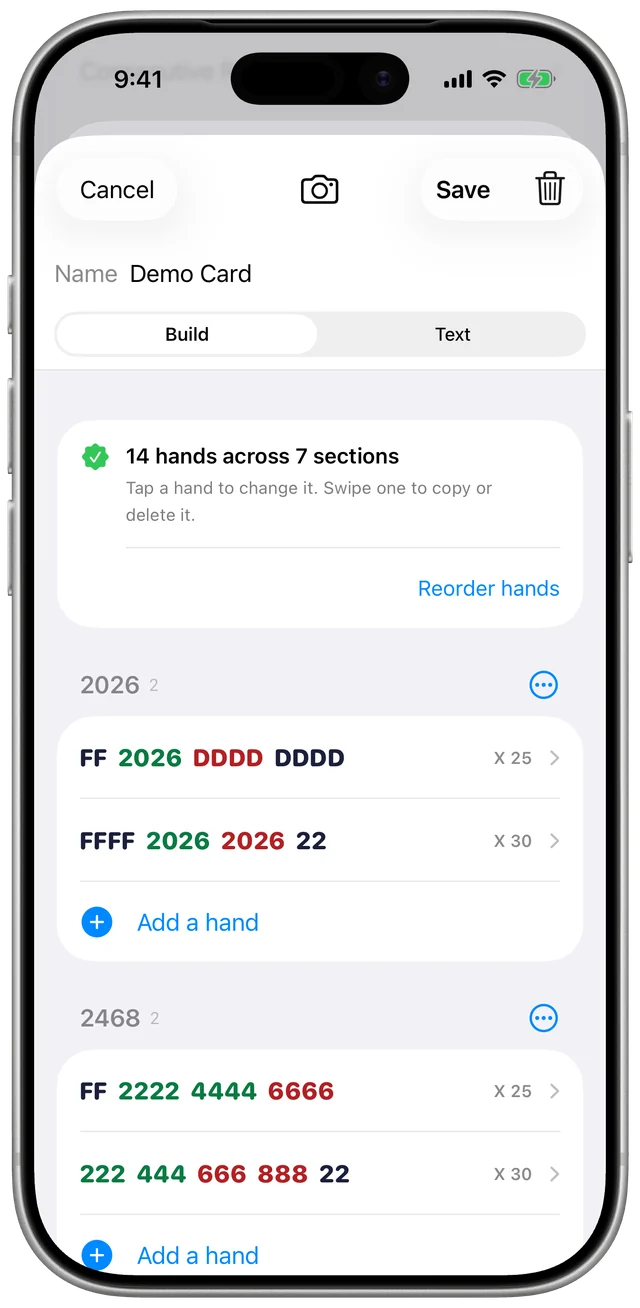
- Tap to build. Pick tiles, colors and groups the way they're printed, and the builder writes each hand out for you.
- Or read it from photos. Take a photo of each panel, filling the frame with just that panel so the text beside it stays out of the shot. The app reads them on your device, then shows each hand next to its photo so you can check it.
- Or type it. Switch the editor to Text and write one hand per line, the way it's printed:
FF 2222a 44a 6666b 88b | 2 suits | X | 30. It checks every line as you type. How the text works - Checked as you go. A hand has to add up to fourteen tiles before it saves, and you'll see real example hands for each one.
And the small things
Made for use at the table.
A card that's easier to read
Browse hands by section, or filter to the sections, concealed or exposed hands, suit counts and joker rules you care about. Star the hands you like to keep them close.
Rules on hand
How to set up — washing, walls, dice and the deal — then the Charleston, calling a discard, jokers and blank tiles, with drawn tiles showing what's easy to mix up. On the printout too.
Print a one-sheet
Every hand on one side and the rules on the other, on a single double-sided 8.5×11 sheet.
Screen stays awake
The screen won't dim or lock in the middle of a hand while the app is open.
House rules
Set your set to 8 or 10 jokers, and turn on blank tiles if your group trades them for discards.
iPhone and iPad
Works in portrait and landscape. An iPad propped up next to your rack shows the whole card at once.
FAQ
Good questions.
Does MAHJ come with this year's card?
No. The official card is copyrighted by its publisher, so the app doesn't include any hands. Buy the card as usual, then enter its hands in the app by tapping them in or reading them from photos. You only do this once per card.
Are those the real hands in the screenshots?
No. The screenshots show an invented demo card made for this page. Its hands aren't from any official card, so don't play from them.
Is this a Mah Jongg game?
Not really. MAHJ is made to use alongside a real game with real tiles. There is a solo practice mode for learning, but the app never plays a hand at your table for you.
Is using it at the table allowed?
That's up to your group. Some tables welcome it for newer players, and some tournaments don't allow any aids. Since each kind of help turns off on its own, you can match whatever your table agrees to.
What happens to my card and my data?
Everything stays on your device: your cards, your rack, your favorites and your settings. Photos of your card are read on the device too. The app has no accounts, no analytics and no ads. See the privacy policy.
Does it follow the standard American rules?
Yes. It assumes the standard 152-tile set, jokers only in groups of three or more, and the full Charleston with its blind and courtesy passes. You can change the joker count and turn on blank tiles if your group plays that way.
How do I try the beta?
MAHJ is in a free public beta through TestFlight, Apple's app for testing apps before release. Install TestFlight on your iPhone or iPad, then open the beta link on that device. The install guide has every step.
Which devices does it run on?
iPhone and iPad running iOS 17 or later.
Bring it to your next game.
MAHJ is in a free public beta for iPhone and iPad. Join through TestFlight and try it at your next game.